Let me start with something most people don’t realize.
Google already shows you your competitors’ ads. Completely free.
No expensive spy tools. No shady browser extensions. No guessing.
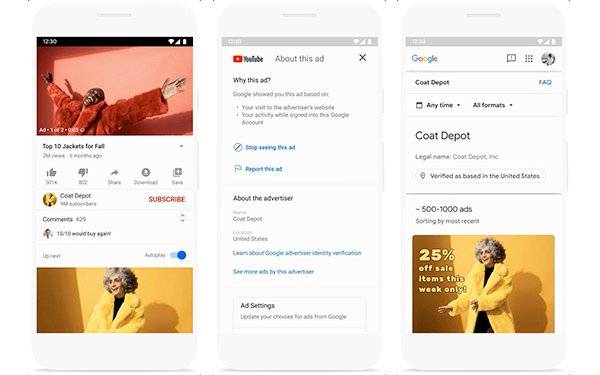
Google built the Google Ads Transparency Center so anyone can see which ads a company is running across Google Search, YouTube, and Display.
Most advertisers barely know it exists.
And the few who do? They use it to quietly study competitors before launching campaigns.
I’ve used this trick for years. When a campaign suddenly loses conversions or CPC jumps, the first thing I check isn’t my own ads.
I check who just entered the auction.
That’s where the Transparency Center comes in.
Let’s walk through how it works, how to use it properly, and the mistakes beginners make when spying on competitors.
What the Google Ads Transparency Center Actually Is


4
Google launched the Google Ads Transparency Center to increase advertising accountability.
Translation? Regulators were pushing them to show who is paying for ads.
For marketers, it accidentally became a competitive research tool.
Inside the Transparency Center you can see:
- Ads running from a specific advertiser
- Search ads
- YouTube ads
- Display ads
- The advertiser identity
- Which country the ad runs in
What you won’t see:
- Keywords
- Budgets
- Performance metrics
- CPC
- Targeting settings
Still extremely useful.
Why?
Because ad creative is where most campaigns win or lose.
You can see messaging, offers, angles, funnels, and landing page strategies.
The Biggest Misunderstanding About Competitor Ad Spying
People think spying means copying.
Wrong mindset.
If you copy ads, you become the second-best version of your competitor.
Instead, look for patterns.
When a company runs the same ad for months, that usually means one thing.
It converts.
Ads that don’t work disappear fast. Google Ads burns money quickly.
So if you see something running repeatedly across different formats…
That’s market validation.
How to Find Competitor Ads in the Transparency Center
This part is ridiculously simple. Which is why many people overlook it.
Open the tool:
ads.google.com/transparency
Then search the advertiser.
You can search by:
- Brand name
- Company name
- Website name
Example searches:
- Nike
- Shopify
- Canva
- HubSpot
- Amazon
Once you open an advertiser profile, you’ll see:
- Active ads
- Past ads
- Ad formats
- Countries where ads run
Now the interesting part starts.
The Smart Way to Analyze Competitor Ads
Most beginners just scroll through ads.
That’s useless.
You want to look for three signals.
1. Repeated Messaging
If several ads repeat the same phrase, that phrase probably converts.
Example patterns:
- “Free trial”
- “No credit card required”
- “Start in 30 seconds”
- “50% off today”
Companies test hundreds of variations.
The winners survive.
Everything else disappears.
What remains is valuable data.
2. Offer Strategy
Look at what they’re offering.
Typical offers include:
- Discounts
- Free trials
- Free shipping
- Limited-time deals
- Bonuses
- Guarantees
Sometimes the offer matters more than the ad copy.
Two identical ads with different offers can have completely different conversion rates.
3. Funnel Direction
Click the ad preview and inspect where it sends traffic.
You’ll usually see one of these funnels:
| Funnel Type | What It Means |
|---|---|
| Landing page | Lead generation campaign |
| Product page | Direct sales |
| Homepage | Brand awareness |
| Quiz / form | Data capture funnel |
| Free trial page | SaaS acquisition |
If several ads point to the same landing page, that page probably converts well.
Marketers rarely send traffic to weak pages repeatedly.
A Trick Most Advertisers Don’t Know
Here’s something I learned years ago running Google Ads audits.
Search the parent company, not the brand.
Example:
Instead of searching only:
“Canva”
Try searching:
- Canva Pty Ltd
- Canva Inc
- Canva Australia
Large companies often run ads under different verified advertiser accounts.
You’ll find ads most competitors never see.
When the Transparency Center Shows Nothing
This confuses people.
You search a brand that definitely runs ads… and nothing appears.
Usually one of these is happening.
The brand uses an agency account
Agencies sometimes run ads under their own advertiser verification.
Meaning the ads appear under the agency name, not the brand.
The advertiser name is different
Some companies register ads under their legal company name.
Example:
| Brand | Actual Advertiser |
|---|---|
| Booking.com | Booking Holdings |
| Meta Platforms | |
| Meta Platforms |
Search variations.
You’ll eventually find them.
How to Spot Winning Ads (The Real Spy Technique)
Here’s the method I train junior media buyers to use.
Open competitor ads.
Then check three things:
1. Longevity
Ads running for months usually work.
Short-lived ads usually failed.
2. Multiple formats
If the same message appears in:
- Search ads
- Display banners
- YouTube ads
That message probably converts.
3. Offer consistency
If several ads push the same offer repeatedly…
That’s a winning funnel.
Why Most Paid Spy Tools Aren’t Actually Better
You’ve probably seen tools like:
- Semrush
- SpyFu
- Adbeat
- SimilarWeb
They estimate:
- Keywords
- budgets
- traffic
- ad positions
But they rely on scraped data and modeling.
Meaning:
They guess.
The Transparency Center is different.
It shows real ads from the advertiser account.
No estimation.
No guesswork.
The Hidden Limitation Nobody Talks About
Transparency Center only shows creative, not targeting.
So you won’t see:
- keyword lists
- bidding strategies
- audience segments
- remarketing lists
- demographics
And honestly?
That’s fine.
Because creative strategy drives the click.
Targeting only decides who sees it.
The Fast Competitor Research Workflow I Use
When launching a new campaign, I usually do this.
Open Transparency Center.
Then check:
• Top 5 competitors
• Messaging patterns
• Offer structures
• Landing page angles
I screenshot ads that appear repeatedly.
Then build better versions.
Not copies.
Better hooks.
Stronger offers.
Cleaner pages.
That process alone has rescued failing campaigns more times than I can count.
One Thing Every Marketer Should Do Immediately
Go search your own brand inside the Transparency Center.
You’ll learn two things instantly.
First: exactly what Google shows the public about your ads.
Second: how your messaging looks compared to competitors.
Most people never check this.
They should.
Because customers see those ads every day.
Now you know how to see them too.